
Published: April 11, 2024 | Last Updated: January 15, 2026

What is an anamorphic lens? Definition & Meaning
Anamorphic lenses capture a wider field of view than standard lenses. They compress the image horizontally, allowing for a broader aspect ratio on the film or sensor. When projected or displayed, the image is stretched back to its original width, giving a distinctive widescreen look with unique optical characteristics, such as oval bokeh and horizontal lens flares. These lenses contribute to the cinematic feel of a movie by enhancing its visual aesthetics.
The article is divided into three main parts:
- A quick start guide for those already familiar with the look, who just want an overview of things like how squeeze factors affect aspect ratio
- A deeper explanation (with examples) of the anamorphic look, and lens and focus types.
- How to fake the anamorphic look on a budget
Anamorphic Quickstart (Quick Guide)
If you just want the essentials, this quickstart explains how squeeze factors affect aspect ratio — and how to correctly de-squeeze anamorphic footage on set and in post.
How Squeeze Factor Affects Aspect Ratio
Anamorphic lenses compress the image horizontally. After de-squeezing, the final aspect ratio is calculated as:
Final aspect ratio = native sensor aspect ratio × squeeze factor
Resulting Aspect Ratios
| Sensor Mode | Native AR | Squeeze | Resulting AR (De-squeezed) | Notes |
|---|---|---|---|---|
| 16:9 | 1.78:1 | 1.33× | ~2.37:1 | Often close to 2.39 without much cropping |
| 16:9 | 1.78:1 | 1.5× | ~2.67:1 | Usually cropped to 2.39 |
| 16:9 | 1.78:1 | 2× | ~3.56:1 | Heavy crop required |
| 4:3 | 1.33:1 | 1.33× | ~1.77:1 | Roughly 16:9 |
| 4:3 | 1.33:1 | 1.5× | ~2.00:1 | Balanced widescreen look |
| 4:3 | 1.33:1 | 2× | ~2.66:1 | Classic 2× anamorphic pairing |
| Open Gate | varies | any | Native AR × squeeze | Example: 3:2 (1.50) × 2× = 3.00:1 |
Note: Open-gate aspect ratios vary by camera and recording mode, so always calculate final framing using the formula above and crop to taste.
De-Squeeze Settings (Post & Monitoring)
| Platform | Reliable Way to De-Squeeze | Notes |
|---|---|---|
| DaVinci Resolve | Clip Attributes → Pixel Aspect Ratio (Anamorphic) | Common per-clip workflow |
| Adobe Premiere Pro | Modify → Interpret Footage → Pixel Aspect Ratio | Options vary by footage/version |
| Final Cut Pro | Adjust horizontal (X) scale (often via compound clip) | No universal “interpret footage” option |
| SmallHD monitors | Built-in de-squeeze (1.33× / 1.5× / 2×) | Essential for accurate framing |
Note: Not all NLEs have a single “anamorphic switch.” For example, the workflow in Final Cut Pro varies due to the lack of a universal de-squeeze option.
Anamorphic Squeeze Factors Compared
Here’s a comparison table that compares the most common de-squeeze modes. It’s a good starting point when you want to dial in the look, you’re looking for:
| Squeeze Factor | Typical Use Cases | Pros | Cons | Anamorphic Character | Monitoring Needs |
|---|---|---|---|---|---|
| 1.33× | Mirrorless, hybrids, run-and-gun | Easy workflow, minimal distortion | Subtle anamorphic look | Mild bokeh & flares | Optional |
| 1.5× | Indie films, commercials | Stronger look without extremes | Less standardized | Noticeable character | Recommended |
| 2× | Narrative cinema | Iconic anamorphic aesthetic | Cropping, weight, cost | Strong bokeh, flares, distortion | Essential |
Why use anamorphic lenses? Capturing close-ups and the background simultaneously: Deep depth of field.

Anamorphic lenses allow you to shoot close-ups without distorting the subject’s face and simultaneously capture background action, creating a deep depth of field.
With a wide-angle spherical lens, you can shoot close-ups and capture background action. However, this lens can create a distorted fish-eye effect on the subject in the foreground, especially if you want to capture much of the background.
Using an anamorphic lens allows you to keep your actor in focus and undistorted while simultaneously capturing important background details. And if you stop it and don’t shoot with a wide-open aperture, you can get a good background that isn’t too distorted.
You might like Best anamorphic lenses for MFT shooters.
What is the Anamorphic Look?
An anamorphic lens will give your film a look different from spherical lenses.
Oval-Shaped Bokeh

- Why it happens:
Horizontal image compression stretches out-of-focus highlights vertically after de-squeeze. - Best used for:
Portraits, subject isolation, stylized cinematic shots. - Watch out for:
Busy backgrounds or scenes that need neutral rendering.
One of the most noticeable features of an anamorphic lens is the oval-shaped bokeh. The bokeh is the blur quality on the image’s outer edges. Because of the squeezing of the image, the anamorphic bokeh balls are oval. The bokeh balls are round with a spherical lens, and the bokeh effect is less prominent than that of anamorphic lenses.
Due to the oval-shaped lens, the image’s horizontal edges appear to be more elongated than the center of the image, causing more blurriness towards the image’s sides than in the center.
If you’re a techie, here’s a nice breakdown of WHY anamorphic bokeh is oval:
Horizontal Flare
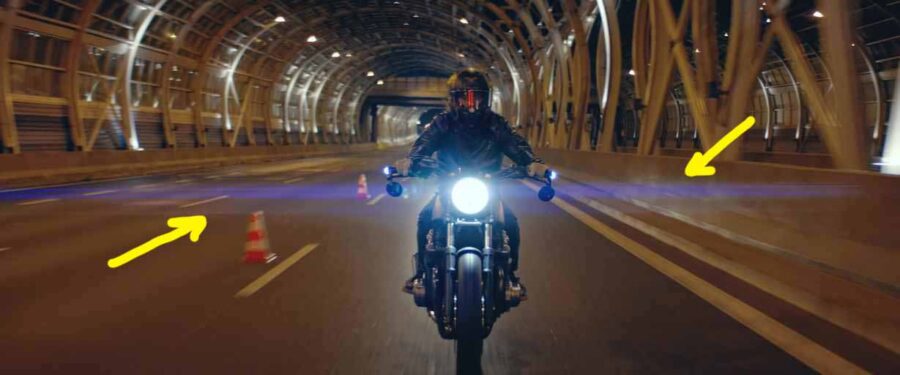
- Why it happens:
Cylindrical lens elements interact with strong point light sources, spreading light horizontally. - Best used for:
Night scenes, sci-fi, stylized visuals. - Watch out for:
Washed highlights and reduced contrast.
Anamorphic lenses tend to capture horizontal flares. A horizontal flare is caused when bright light hits the glass and streaks horizontally across the lens. Streetlights, headlights, and reflections from the sun can produce horizontal flares.
The streaks extend horizontally from the light source and are more noticeable when the light is directed at the lens. The bigger the lens’s stretch factor, the bigger the horizontal flaring effect.
Some lenses flare more quickly than others, as the number of optical elements and glass coating affect the effects.
The coating (or lack thereof) and the glass also affect the colors of the flares. While some lenses have bright blue flares (typically seen in sci-fi), others have other or multiple colors.
Edge Distortion & “Anamorphic Mumps”
Why it happens:
Uneven compression across the image is common in vintage or lower-cost designs.
Best used for:
Vintage aesthetics and expressive imagery.
Watch out for:
Faces near frame edges and product shots.
One lesser-known characteristic of anamorphic lenses is edge distortion, often referred to as “anamorphic mumps.” This happens when the lens does not apply its horizontal squeeze evenly across the entire frame.
In some anamorphic designs (especially older or more affordable ones), subjects placed near the edges of the frame can appear unnaturally stretched or widened after de-squeezing. Faces may look broader, and proportions can feel slightly “off” compared to the center of the image.
When used intentionally, this distortion can add character and a vintage feel to an image. But in close-ups or dialogue scenes, it’s usually something cinematographers try to avoid by keeping faces closer to the center of the frame.
Modern anamorphic lenses tend to control mumps much better, but it’s still an important factor to consider when composing shots, particularly when working with wider focal lengths or placing people near the edges of the frame.
Read more on lens distortion and what causes it.
Quick Summary
| Trait | Optical Cause | Best Use | Main Risk |
|---|---|---|---|
| Oval bokeh | Horizontal compression | Portraits | Distracting backgrounds |
| Horizontal flares | Cylindrical elements | Stylized lighting | Highlight washout |
| Edge distortion | Uneven squeeze | Vintage looks | Warped faces |
Types of Anamorphic Lenses Based on Squeeze Factor
The squeeze factor of an anamorphic lens determines how much it compresses the image. Understanding this is essential to understanding the variety of looks achieved with anamorphic lenses.
2x Squeeze
The 2x squeeze is the most classic type, literally squeezing the image by a factor of two. If you’re shooting on a standard 4:3 sensor, you’ll have an ultra-wide 2.66:1 aspect ratio. It’s the hallmark of the cinematic widescreen effect, offering beautiful bokeh and distinctive lens flares that many filmmakers covet.
1.5x Squeeze
The 1.5x squeeze lenses are more versatile, offering a slightly less extreme squeeze. This is great for those looking to achieve a wide aspect ratio, such as 2.39:1 on a 16:9 sensor, bridging the gap between traditional and anamorphic looks. It’s a popular choice for digital cinema cameras today, balancing the unique anamorphic characteristics with modern shooting requirements.
1.33x Squeeze
For those seeking a subtle anamorphic look, the 1.33x squeeze lenses offer just that. They’re perfect for getting a wider field of view on 16:9 sensors, bringing the aspect ratio to approximately 2.35:1. It’s a gentle introduction to anamorphic shooting, allowing for a distinctive look without drastically altering the footage.
Focusing Technology in Anamorphic Lenses
Anamorphic lenses also vary significantly in how they focus, which can affect both their usability and the aesthetic of the footage.
Dual Focus
Traditionally, anamorphic lenses required dual focusing, meaning the filmmaker had to adjust the anamorphic attachment and the taking lens to sharpen the image. This method is more challenging and time-consuming, often requiring a skilled focus puller for precise adjustments.
Single Focus
Single-focus solutions have been developed to simplify the process. These systems allow you to adjust focus using just one ring, streamlining the shooting process. This advancement has made anamorphic lenses more accessible and user-friendly, especially for solo shooters or those on tighter budgets.
Variable Focus
Some modern anamorphic lenses incorporate variable focus mechanisms, which can adjust the squeeze factor depending on the focus distance. This gives you more creative control but also demands a lot of technical skills as a filmmaker or focus puller.
Adapting Vintage lenses: A cheaper shortcut to the anamorphic look
If you want to get into anamorphic lenses and save money, it’s possible to combine cheap vintage lenses, such as a Canon FD 50mm, with an anamorphic lens adapter or even cinema scopes like those from Isco and Bolex.
It requires extensive research and knowledge, and depending on the type of focus you want, it can also require extensive tinkering and knowledge of diopters, scopes, adapters, and more.
It’s a rabbit hole beyond this article’s scope (pun intended!) to explore. Instead, I recommend you visit Tito Ferradans’s website, one of the leading experts on creating anamorphic on a budget.
How To Fake The Anamorphic Look
While anamorphic lenses offer many advantages, there are other ways to create a similar look, at least to some extent.
- Tools:
- (free) Letterbox crops, digital flares, blur plugins.
- (budget) Anamorphic adapters, oval bokeh filters, streak filters.
- (free) Letterbox crops, digital flares, blur plugins.
- Pros:
- Partial optical effects at lower cost.
- Cons:
- No real anamorphic optics.
- Extra complexity, inconsistent results.
- No real anamorphic optics.
Use an Anamorphic Filter
An alternative to an anamorphic lens is an anamorphic filter. A filter lets you fake the anamorphic look before spending money on a lens. The filters, also known as anamorphic adapters, are designed to fit over your camera’s standard prime lens.
The SLR Magic 1.33x Anamorphic Adapter is a great example. It adds the same bokeh and streaks associated with anamorphic footage. It converts the prime lens into an anamorphic lens. The filter artificially adds horizontal flare and stretches or crops the image to achieve the 2.39:1 aspect ratio.
Digital and physical anamorphic filters do not produce a true anamorphic image. While a filter allows you to fake the anamorphic look, an anamorphic lens provides better resolution.
Add horizontal flares in post-production.
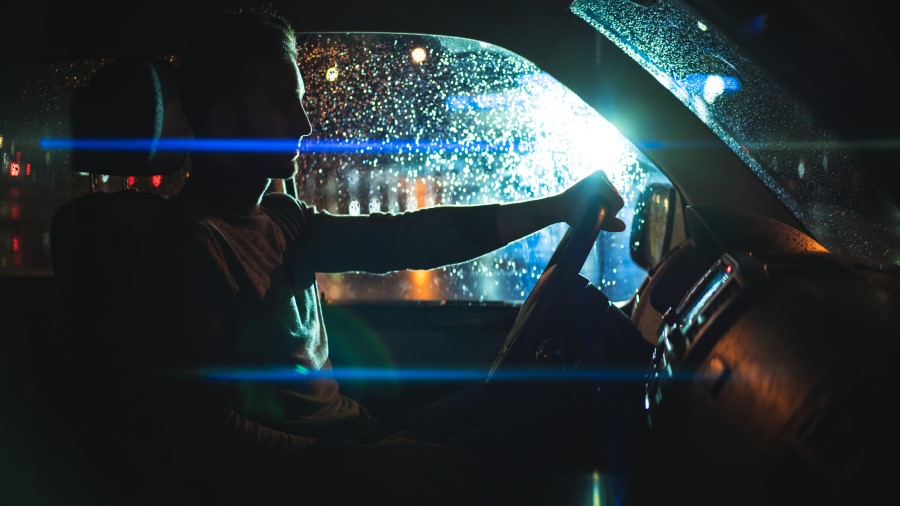
Another way to fake a part of the anamorphic look is to add flares in the post.
You can purchase stock footage flares on a black background (alpha). You then add this as a layer on top of your footage and track the lens flares to match your light source in the scene. Here are 17 free anamorphic lens flares from PremiumBeat.
Another route is to use the Optical Flares plugin for After Effects from Video CoPilot, which can create all sorts of lens flares (not just anamorphic).
Summing Up
Anamorphic lenses were initially developed to fit wider images onto standard film stock (see CinemaScope), helping filmmakers create that cinematic look with a wide letterbox format without sacrificing image quality or parts of the scene.
With digital mirrorless cameras and better editing software, anamorphic lenses have become affordable and popular among indie filmmakers and videographers who want to capture that coveted widescreen anamorphic look.
Many digital cameras, external monitors, monitor recorders, and editing software allow you to de-squeeze anamorphic footage, so you no longer have to use an anamorphic film projector to view the footage.
Anamorphic lenses offer a distinct and desirable aesthetic that can elevate the visual storytelling of your film or video project. Whether you’re drawn to the classic 2x squeeze for its cinematic flair, the versatility of a 1.5x squeeze, or the subtlety of a 1.33x option, there’s an anamorphic lens to suit your creative vision.
If you still find anamorphic lenses too much of a hassle, you can always fake it until you make it, at least to some extent.
Read Next: Want to explore how lenses affect your shot?
Browse all lens-related articles, from focal length and bokeh to distortion, compression, and more.
Looking for a broader context? Visit the Cinematography section for composition, movement, and lighting techniques.
Further Reading & Authoritative References
For deeper technical insight and industry-standard practices, these sources are widely respected:
- American Society of Cinematographers (ASC) — lens and optics articles
- Cooke Optics — anamorphic lens design explanations
- ARRI — sensor formats and open-gate workflows
- Atlas Lens Co. — modern anamorphic characteristics
- Tito Ferradans — practical anamorphic breakdowns and education (Anamorphic Cookbook)
