

Published: November 26, 2025 | Last Updated: December 5, 2025

What is a colorist in film? Definition & Meaning
A film colorist is a post-production expert responsible for adjusting color, exposure, and contrast in footage to fix technical issues, apply a color palette that fits the story’s tone, and ensure consistency between shots.
Colorists work after editing is locked. They correct problems like color imbalance or uneven lighting, and then apply grading that reflects the film’s emotion, setting, and genre, such as using desaturated blues for isolation or warm amber for nostalgia.
Their work happens in software like DaVinci Resolve, using high-quality formats like RAW or LOG that allow full control over contrast, hue, and brightness.
Correction vs Grading

The colorist’s job is split into two parts: technical correction and creative grading.
Color Correction
This step fixes problems in the raw footage. A shot might be too warm, too dark, or not match the next one. The colorist adjusts exposure, white balance, contrast, and hue so the footage looks natural and visually consistent. This is especially important when scenes were filmed with different cameras or under changing lighting conditions.
Color Grading
After correction, the colorist builds a unified look across scenes using grading tools. They push the shadows toward cooler tones and reduce saturation so the surroundings feel colder and less predictable, supporting the tension built through camera movement and timing, or golden tones for warmth and memory. This visual approach supports the story’s emotional and narrative beats.

In The Matrix (1999, Warner Bros.), the green tint added to scenes inside the Matrix signals that the world is artificial. That contrast with the real world’s neutral look helps separate the two environments visually.
Colorists can also isolate parts of the image using masks and tracking. This lets them brighten a subject’s face, change the color of a wall, or reduce saturation in the background, without affecting the rest of the frame.
Read more on the difference between color correction and grading.
How Color Supports Storytelling
Color grading helps you feel a scene’s emotion. A slight shift in hue or contrast can suggest fear, calm, tension, or safety. Changes in tone and palette can also track character development or mark shifts in time and place.
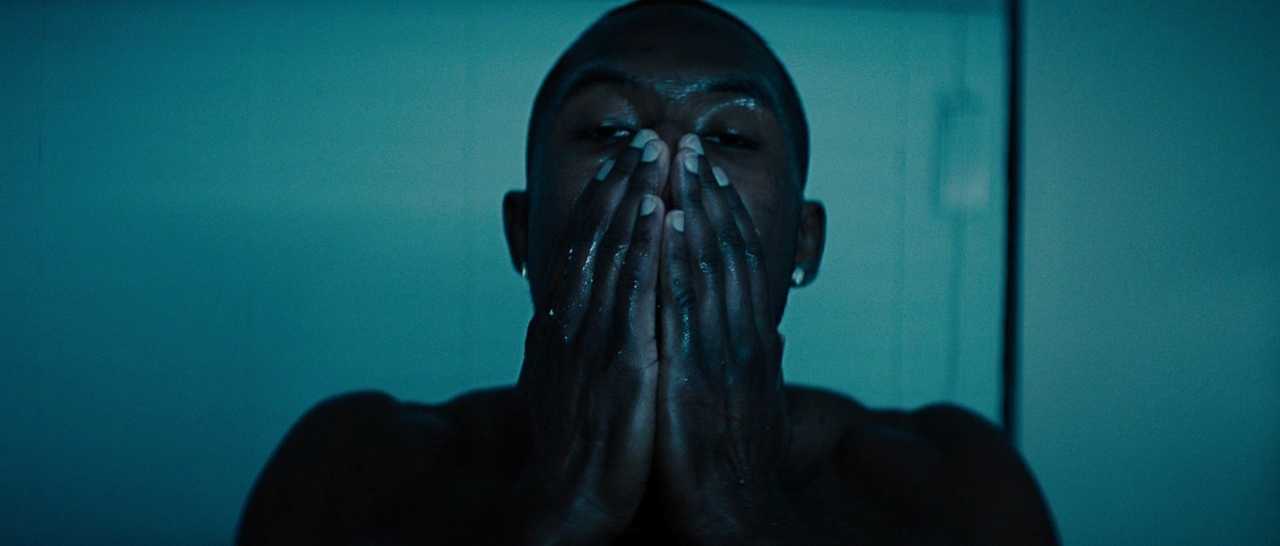
In Moonlight (2016, A24), the film repeatedly returns to blue‑toned lighting (especially in water scenes and moments of introspection) to reflect vulnerability, identity, and inner conflict. As Chiron grows older and faces violence, societal pressure, and identity challenges, the film’s grading and palette shift depending on mood: sometimes colder and muted, sometimes warmer and harsh, sometimes saturated with color, creating a complex visual journey rather than a uniform progression.
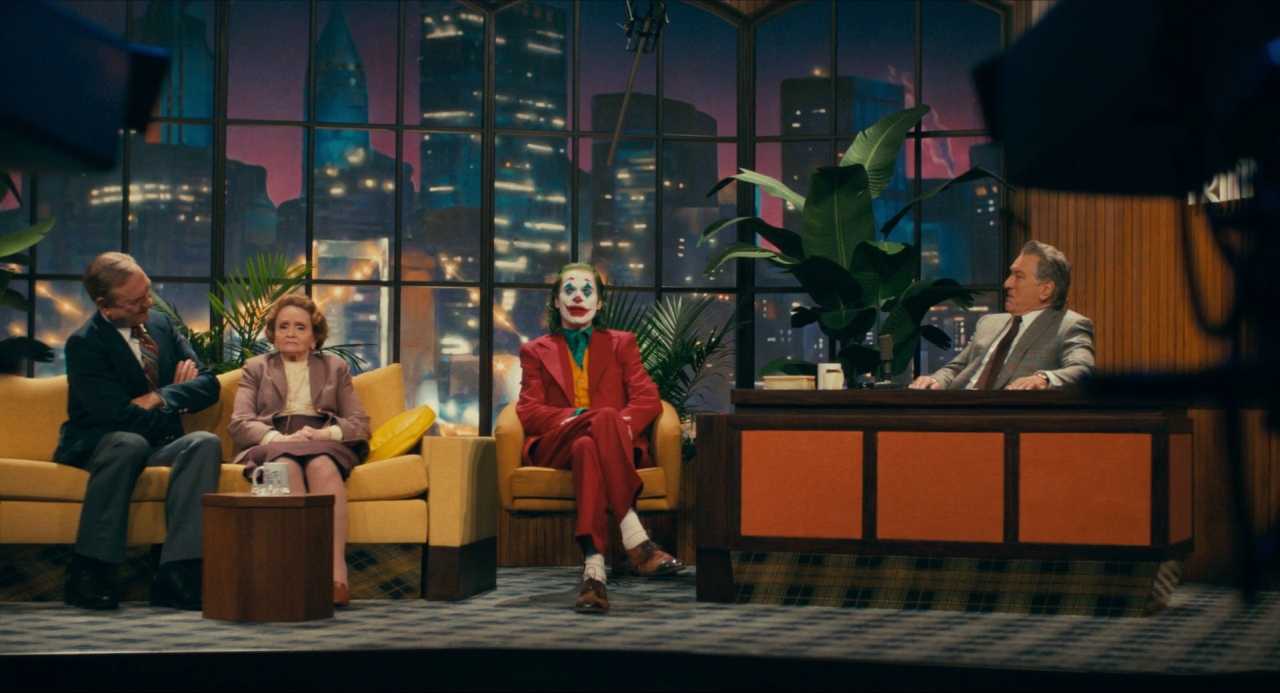
In Joker (2019, Warner Bros.), the color palette uses cold, blue‑toned hues to reflect societal alienation and despair in early scenes. As the character’s emotional state and identity shift, selective boosts in saturation, red tones, and clashing costume colors signal internal chaos, anger, or transformation. See Lawrence Sher’s breakdown of his lighting colors in the film.
Read more on color psychology in film.
Colorist Workflow: From Prep to Delivery
Colorists usually join the project after the edit is locked. But on large productions, they’re involved earlier. They may help test camera setups, lighting, and costume materials in pre-production, or create a custom LUT (Look-Up Table) to guide the on-set look. Some also grade dailies (early cuts of footage) so the team can check contrast, color balance, and lighting consistency during production.
Once editing is complete, the colorist performs final grading. After that, they prepare the film for different outputs: theatrical (DCP), streaming (HDR/SDR), or TV (Rec. 709 broadcast masters). Each format has specific requirements for brightness, contrast, and color space. The colorist ensures that each version matches the intended look, with no shifts in tone or saturation between platforms.
They also match any subtitles, VFX elements, or title cards to the final grade, so nothing looks out of place. This process keeps the entire film visually coherent, no matter where it’s seen.
Tools, Formats, and Workflows

Colorists use advanced tools and calibrated monitors to measure every part of the image. Common software includes:
- DaVinci Resolve – the most widely used color grading platform for film
- Adobe Premiere Pro – used for commercial and indie post workflows
- Final Cut Pro – often used on smaller sets or for quick turnarounds
They also use waveform monitors to check exposure and vectorscopes to measure color accuracy. For example, all human skin tones (regardless of ethnicity) fall along the same diagonal line on the vectorscope. The difference lies in brightness and saturation. The colorist uses this reference to make sure skin tones stay natural, even under unusual lighting setups.
Colorists also manage complex file formats like BRAW, ProRes, or R3D, and often work within color-managed systems like ACES (Academy Color Encoding System). ACES keeps color consistent across editing, grading, and VFX, even if the project uses footage from multiple cameras. For HDR versions, the colorist carefully adjusts shadows and highlights to preserve contrast while keeping the mood intact.
Working with Directors and DPs
The colorist collaborates closely with the director, cinematographer (DP), editor, and sometimes the production designer. The DP might explain how a practical light source was used to motivate the scene. The director might ask for cooler tones during a confrontation or warmer light during a memory sequence. The colorist translates those requests into precise color adjustments.
Read more on Color Theory.
They also communicate with VFX artists and post supervisors to make sure color remains stable even when effects or overlays are added later. The role requires both technical precision and creative communication to ensure every part of the image supports the film’s intent.
A Brief History: From Color Timing to Digital Grading
Before digital post-production, color was handled in labs through “color timing.” Technicians adjusted printer lights to change exposure and tint during film printing. These changes were limited and took days to process.
Today, digital colorists have full control. They can isolate a shadow, push the highlights, soften skin tones by reducing contrast in bright areas, or balance color zones frame by frame. The modern colorist combines image science, software precision, and visual storytelling in every shot.
Summing Up
A colorist fixes color problems, balances shots, and grades each scene to match the film’s emotion, tone, and structure. They use scopes, LUTs, and calibrated monitors to make every shot look intentional and connected. By working with the director and DP, they give the film a visual identity that holds up across formats and platforms, from cinema screens to smartphones.
Read Next: Ready to level up your color work?
Start with our main Post-Production hub to see how editing, sound, and color come together to build the final cut.
Then explore the full Color Grading section for guides on color theory, contrast, LUTs, scopes, and practical workflows you can use in DaVinci Resolve.
