

Published: August 23, 2019 | Last Updated: May 26, 2025

Knowing how to edit a video to music and get a good result takes some time and practice.
Here are five tips for editing video to music for non-musicians, from getting familiar with waveforms and song structures to counting beats and subdivisions.
The last trick explains how to apply this knowledge and semi-automate the process in Premiere Pro.
1. Get Familiar with the Waveform
Knowing how to read a waveform is essential, even more so if you edit your video to music. This goes for corporate shots with background royalty-free music and music videos.
First, single out each sound’s attack peak as the basis for your edit. Like so:

2. Sing/Count to Identify Beats and Subdivisions
It can be challenging to see the attack peaks for each beat and rhythmic subdivision of a song on heavily compressed tracks.
Practice counting the beats yourself. In the beginning, you can count the beats 1, 2, 3, and 4 to get the basic beat down.
This is especially helpful if you cannot cut to a kick drum or snare, which is easily seen in the waveform. It is also helpful if there are many syncopated subdivisions.
How to count subdivisions in music
If you want to cut to the rhythmic subdivision of a song, you can start counting 1/8-notes, 1/16-notes, or even 1/8-note triplets (if they’re present):
- Count 1/8-notes as 1 &, 2 &, 3 &, 4 &.
- Count 1/16-notes as 1 e & a, 2 e & a, 3 e & a, 4 e & a.
- Count 1/8-note triplets as 1 trip let, 2 trip let, 3 trip let, 4 trip let, or 1 e and, 2 e and, 3 e and, 4 e and.
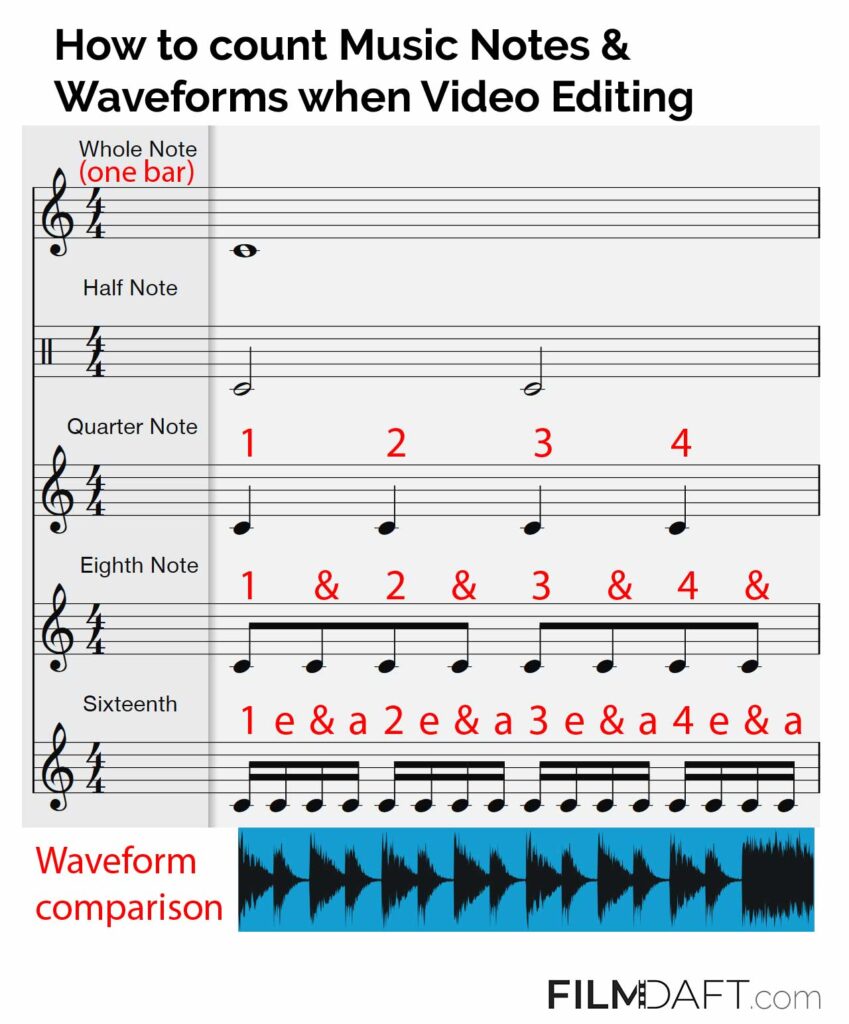
This is a great technique for identifying, for example, a 1/16-note lift in a heavily compressed track.
3. Break Down The Song Structure Into Its Basic Building Blocks
Break down the song into its basic components or building blocks, i.e., to identify the basic parts of the song, like the intro, verse, bridge, chorus, breakdown, and outro. Not all songs have all these parts, but you’ll usually find some of them.
Breaking the song into its basic structure and making some cuts gives you a quick overview of its dynamic differences, which will help you later when editing your video.
Use The Song Structure To Guide the Story in A Video
Inherent in most music tracks is a story. I’m not talking about the lyrics here, but the dynamic highs and lows—like the differences in the dynamics between a verse and a chorus.
Music doesn’t differ much from a narrative in movies. For example, a narrative in film might follow the Hollywood Model structure:
teaser -> elaboration -> point of no return -> conflict escalation -> climax -> resolution -> denouement).
A typical pop song often follows a similar structure. For example:
Intro – Verse – Bridge – Chorus – Verse 2 – Bridge – Chorus – Breakdown – Chorus – Chorus – Outro.
Typically, the intro and first verse are mellow (unless they start with a hook, which is great if you want your video edit to start in media res). Then, you’ll get to the bridge, where the dynamics will keep building up to the first chorus, the first dynamic peak in the song.
These basic song structures can serve as the basis for your video editing. For example, you might start with some calm footage to set the scene and then slowly transition into more fast-paced edits as the song’s energy starts to build up.
4. Use The Rhythmic Subdivisions To Create A More Dynamic Video Edit
If you only cut between two video clips on the first beat of a bar, your video will become dull and predictable. Instead, use rhythmic subdivisions like syncopated chords or percussion as the basis for your edits.
A hard cut on the 1/16-note lift just before the first downbeat of the next bar will be more interesting to the view than if you just cut on the downbeat itself. Similarly, you can surprise the viewer by skipping the first downbeat and cutting to the second downbeat of a bar.
5. Automate To Sequence Using Markers – The Fastest Way To Sync Video To Music
Automate To Sequence is a technique that allows you to take advantage of the automation of markers inside your editing software of choice.
When you automate the sequence, you’re essentially tapping to the beat (or off-beat) of the music on your keyboard and placing markers to quickly place your video footage afterward.
If you prefer just to read the steps, here they are (there are more in-depth explanations and tips and tricks in the video):
- Set up a new project, create a sequence with your preferred settings (frame rate, aspect ratio, etc.), and drag the music into an audio track.
- Scroll through your footage in the Project Folder, and set in-points (press “i” on the keyboard) for all the clips you want to apply to your timeline.
- Press play and add markers (by pressing “m” on the keyboard) to the beats, off-beats, and 16th notes of the song to your liking – while you hear the song.
- When done make sure all the markers are selected.
- Select the clips you want to automate to the sequence in your Project Folder by pressing shift or ctrl.
- Press “Automate To Sequence” under Clips – or by pressing the button in the lower right corner just beneath your Project Folder
- Set the preferred settings in the pop-up window. Use “Selection Order” under ‘Ordering’, and “At unnumbered markers” under ‘Placement.’
- Hit ‘OK’
In Closing
I hope you find these ideas helpful.
In the video examples, I’ve limited myself to only using hard cuts, but of course, you can go crazy with all kinds of fancy transitions like rolling zooms, swish pans, color burns, glitch effects, etc.
Often, though, it’s best to use more fancy effects later in the editing stage when you’ve got all your basic footage and the overall structure of your video. Music is a great tool for this.
Feel free to share any of your work if you’ve found any of these techniques useful. Also, if you have any comments or ideas, please let me know in the comment section below.
Read Next: Get to know Music Licenses for Video
