

Published: November 19, 2025 | Last Updated: January 19, 2026

What is White Balance? Definition & Meaning
White balance is the process of adjusting color so that white appears neutral under any lighting condition. Your eyes automatically adapt to different light sources, but your camera needs guidance. White balance removes unwanted color shifts from the light, like orange tones from lamps or blue tones from shade, so white objects appear white, skin tones stay natural, and colors stay the same across different shots.
How Color Temperature Works

Every light source has a color temperature, measured in Kelvin (K). Warmer lights like candles and tungsten bulbs appear orange. Cooler lights, like shade or overcast skies, appear blue. Your camera adjusts for these temperatures to keep white and neutral colors correct.
Some lights, like fluorescents or LEDs, also introduce a green or magenta tint. White balance tools remove both types of color problems, like a green tint from office lights or a purple cast from cheap LEDs.
Common Lighting Temperatures

Here are typical Kelvin values for common light sources:
- Candlelight: 1,800 K (very warm)
- Tungsten bulbs: ~3,200 K (warm)
- Daylight: ~5,600 K (neutral)
- Cloudy sky: ~6,500 K (cool)
- Shade: ~7,500 K+ (very cool)
White Balance Tools on Your Camera
Most cameras offer several ways to control white balance. These tools help you respond to different lighting conditions with accuracy and control.
Automatic White Balance (AWB)

AWB (or simply auto) guesses the white point based on the scene. It works best when the lighting is even and comes from a single source, like daylight through a window. But it can shift mid-shot or misread the scene, making one side of the frame too blue and the other too orange.
Presets for Common Lighting
Presets match standard environments. They’re useful for fast setups when your lighting stays the same:
- Daylight: For outdoor sunlight (~5,600 K)
- Tungsten: For indoor orange bulbs (~3,200 K)
- Fluorescent: For green-tinted tubes (~4,000 K)
- Shade / Cloudy: For cooler outdoor scenes (~6,500–7,500 K)
Custom White Balance

Custom white balance uses a white or grey card under the actual lighting. The camera sets white based on that reference. This is especially useful in locations lit by both window light and artificial bulbs, where no preset would work correctly.
Kelvin Mode
Kelvin mode lets you manually input a color temperature. This gives you full control on set. Use it when you know the light’s temperature, so you can match it exactly without guessing. For example, set 3,200 K for tungsten lights or 5,600 K for daylight LEDs.
Creative Use of White Balance in Film
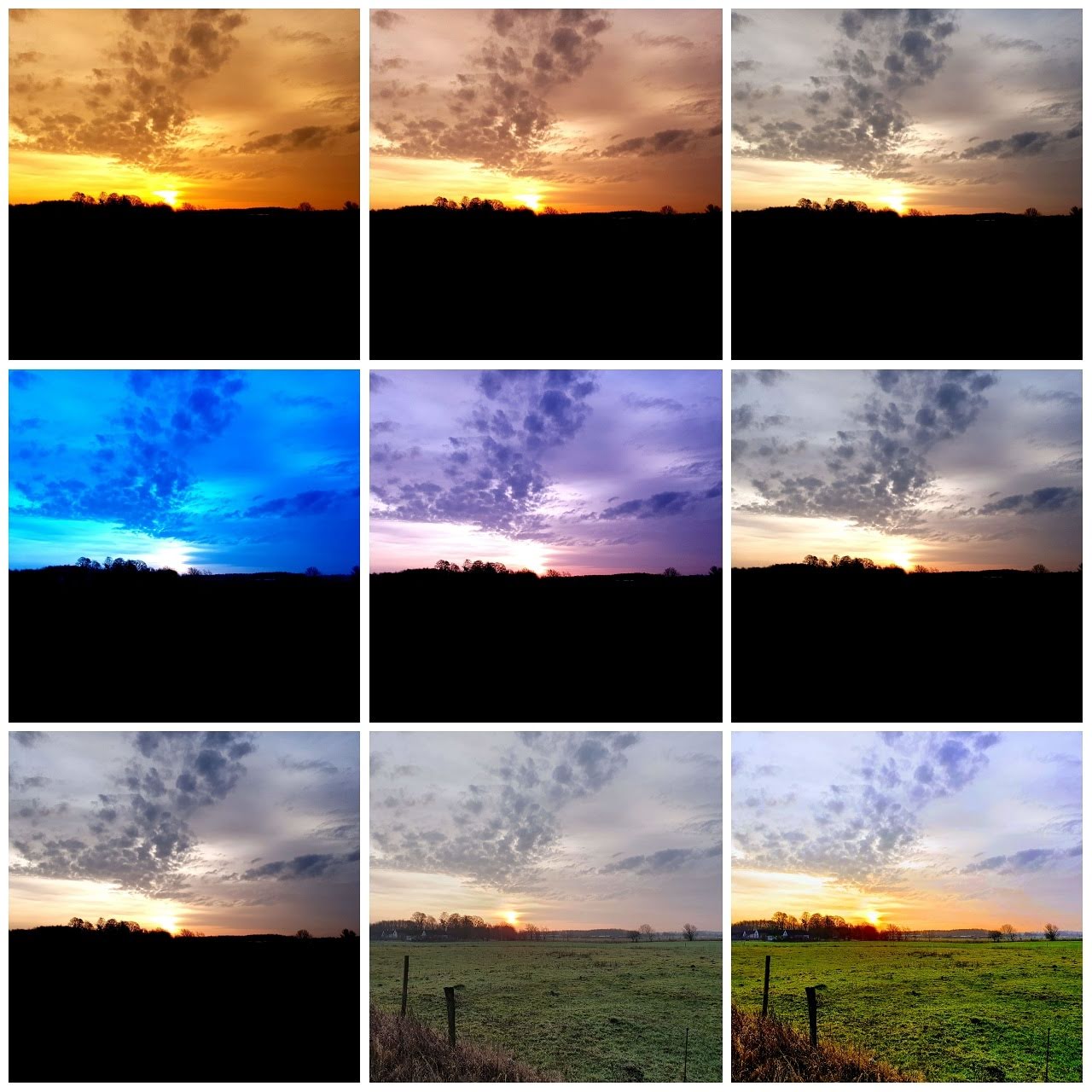
White balance is also a creative tool. Shifting the color on purpose can support a scene’s mood or emotion.

In Moonlight (2016, A24), cool blues and purples highlight emotional distance and isolation. These looks are created by adjusting the white balance in-camera and then pushing the colors further in color grading to match the film’s tone.
Fixing White Balance in Post
How much you can adjust white balance during editing depends on the format you use when shooting:
- RAW: Saves full color data. You can change white balance freely without damaging the image.
- JPEG / Video (Rec.709): Locks in the white balance. Large shifts later can create color noise or make skin tones look flat and unnatural.
That’s why most professional shoots use RAW or LOG formats. They keep white balance flexible during color grading.
Mixed Lighting: A Common Challenge
Mixed lighting happens when more than one type of light appears in the same shot, for example, daylight through a window mixed with a tungsten lamp. Each light has a different color temperature, which can cause white objects to look different across the frame.
This makes some areas look normal while others shift toward orange or blue. It can make one part of the frame feel colder or warmer than the rest, which draws attention away from the subject and creates visual confusion between shots. Here’s how to handle it:
- Pick the dominant light source and balance for that
- Use gels or colored LED lights to match all lights to the same temperature
- Avoid combining daylight and tungsten in one scene if possible
- Shoot in RAW so you can fix problem areas separately during grading
Some cameras also offer white balance bracketing, which saves multiple versions of the same shot with different settings, giving you options later.
Quick White Balance Checklist
Use this list to avoid color problems and save time in post:
- Set custom white balance using a grey card when possible
- Keep all lights in a scene at the same color temperature
- Use Kelvin mode when you know the light’s exact temperature
- Lock white balance before each take to prevent mid-shot shifts
- Shoot RAW or LOG if you plan to grade later
- Check color on a calibrated monitor; camera LCDs often shift colors, especially outdoors
Summing Up
White balance is the process of adjusting color so whites appear truly white under any lighting. It protects skin tones, keeps color consistent, and helps you build a visual look that fits your story. White balance directly affects how skin, costumes, and sets appear on camera, and fixing it later is much harder if you don’t get it right while shooting.
Read Next: Want to get confident with your camera?
Start with our main Cinematography hub to see how lenses, lighting, movement, and exposure work together to create the final image.
Then explore the full Camera section for guides on camera bodies, sensors, white balance, file formats, and the technical tools you work with on set.
You can also visit our Camera Shots & Angles pages to learn how framing and shot choice drive mood, pacing, and meaning.
