

Published: December 17, 2025

What is motion blur? Definition & Meaning
Motion blur is the visible streaking or smearing of moving objects in a frame because the subject, the camera, or both move while the shutter is open during exposure.
Motion Blur in Film and Cinematography
Motion blur affects how fast or smooth movement looks in a scene. It happens because cameras record movement over time while the shutter is open. When the shutter is open, light can hit the sensor and record an image.
You can control the amount of motion blur by adjusting shutter speed, shutter angle, and frame rate. When used intentionally, motion blur can make movement feel natural, chaotic, or surreal.
If you use the wrong settings, it can make action scenes look unclear or choppy. For background on exposure and movement, see What Is the Exposure Triangle?.
How to Create Motion Blur in Film
These techniques can be used individually or combined to create intentional motion blur:
- Slow shutter speed / wide shutter angle (e.g. 1/24s or 270°) — increases blur during movement
- Fast subject motion — the quicker an object moves, the more blur appears at low shutter speeds
- Camera movement — panning or handheld shots can add directional blur
- Swish pans — fast horizontal camera movement creates streaked, disorienting blur
- Long exposures or frame blending — especially in experimental or surreal sequences
- Post-production effects — digital blur can be added or amplified in editing or compositing
- Slow frame rate + step printing — used to blend motion and blur in stylized ways (e.g. Gladiator)
Each method changes how movement feels on screen—blur is always a choice, not just a byproduct.
Why Motion Blur Is Used Intentionally in Film
Motion blur isn’t just a technical side effect, but often a creative decision (as it should be). Cinematographers adjust blur to control how movement feels on screen. The amount of blur in each frame affects how natural, chaotic, or surreal the action looks.
Showing Speed and Smoothness
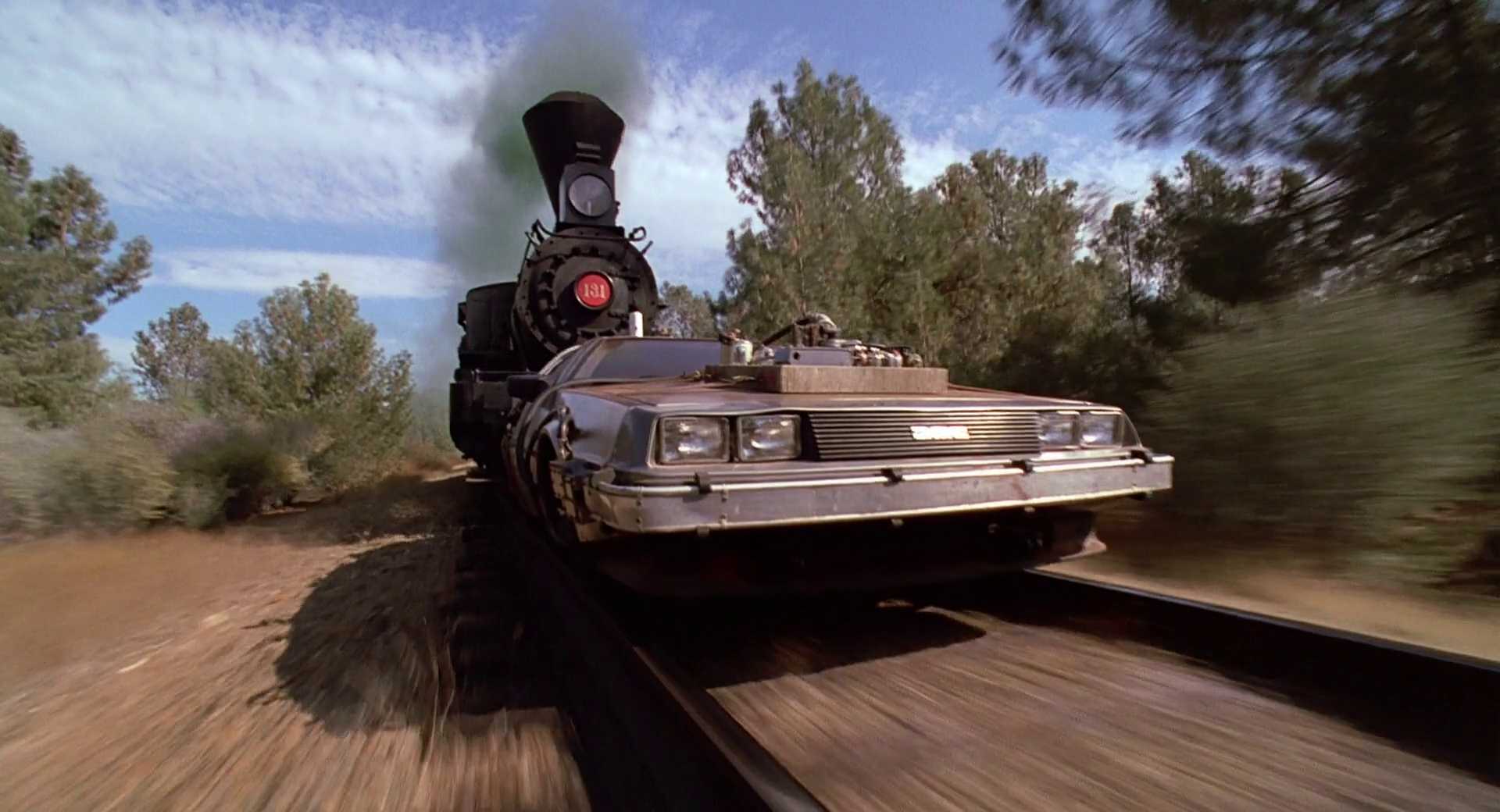
In fast action scenes, blur helps movement feel continuous and fast. When a car speeds by or a character runs across the frame, a bit of blur adds fluid motion. Without it, the movement can look too choppy or digital.
Creating Intensity and Chaos

Sometimes cinematographers reduce blur to make action feel sharper or more violent. In Saving Private Ryan (1998, DreamWorks), Janusz Kamiński used a narrow shutter angle to capture the D-Day landing with almost no blur. The result was a jittery, harsh image that made the battle feel more immediate and chaotic. I’ll get back to the sequence later in this article.
Altering Perception
Motion blur is often used to represent a character’s inner state, especially when their perception of time or reality breaks down. This can include panic, intoxication, or daydreaming. Blur helps shift the visual world into something more subjective. Here are some good examples to analyze further.
Chungking Express (1994): In the opening chase, the background turns into streaks of light and bodies while Cop 223 remains clear. This shows tunnel vision under adrenaline and stress.
Fear and Loathing in Las Vegas (1998): During the “ether phase,” motion and focus dissolve together to show the breakdown of perception under drugs.
Fallen Angels (1995): In a black-and-white slow-motion scene behind a rain-soaked window, blur and slowness turn time syrupy, as if watching a warped memory.
Motion Blur to Suggest Memory or Nostalgia
Motion blur can also be used to slow things down in a reflective, emotional way. Instead of showing chaos or speed, it makes time feel stretched, like a memory being replayed slowly. This supports themes of loss, longing, or emotional distance.
Chungking Express (1994): Again, I think Chungking Express is a great example. In scenes with Cop 663 and Faye, they move in slow motion while the crowd blurs past. It makes the moment feel saved, replayed, and emotionally loaded.
Matching the Film Look
Using the standard 180° shutter angle gives motion blur that matches the feel of traditional 35mm film. This blur has become part of how we expect movies to look. Choosing to break from that (by adding more or less blur) changes the rhythm and feel of a scene.
Motion Blur in Photography

Motion blur happens in photography when a subject moves while the camera’s shutter is open. This creates a streak or blur that shows the path of the motion. You often see this in photos of cars, waterfalls, or night scenes with light trails. The longer the shutter stays open, the more blur you get. It’s one of the ways to capture time in a still photo.
In cinematography, the same principle applies, except instead of one image, you’re capturing 24 or more frames per second. Shutter speed (or shutter angle) controls how much motion blur is recorded in each frame. This affects how smooth or sharp movement looks on screen.
How Shutter Speed and Shutter Angle Affect Motion Blur
Motion blur happens when an object moves across the frame during the time the shutter is open. This results in streaks or smearing in a single frame. The faster the subject moves (and the longer the shutter is open), the more blur appears:
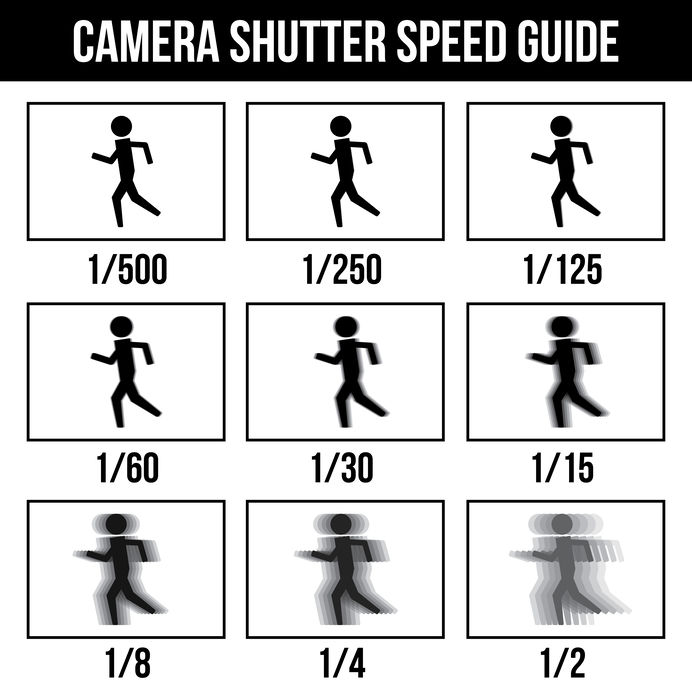
You can control blur using shutter speed, shutter angle, and frame rate. These are all explained in more detail in How to Choose the Right Camera Settings for Video.
- Shutter speed: The length of time each frame is exposed, usually measured in fractions of a second (e.g., 1/48). Slower speeds create more blur. Faster speeds create less.
- Shutter angle: A cinema term describing exposure time as an angle relative to the frame rate. A 180-degree angle gives a natural level of blur at 24 fps.
- Frame rate: The number of frames recorded each second. Higher frame rates reduce blur per frame but require faster shutters for clarity.
For example, at 24 frames per second, a 180-degree shutter angle equals a shutter speed of 1/48. If you lower the shutter angle to 90 degrees, you reduce exposure time and motion blur. If you raise it to 270 degrees, you increase both.
The 180‑Degree Shutter Rule
The 180-degree shutter rule comes from film cameras with rotating shutters. It refers to using a shutter angle of 180°, which exposes each frame for half the time between frames.
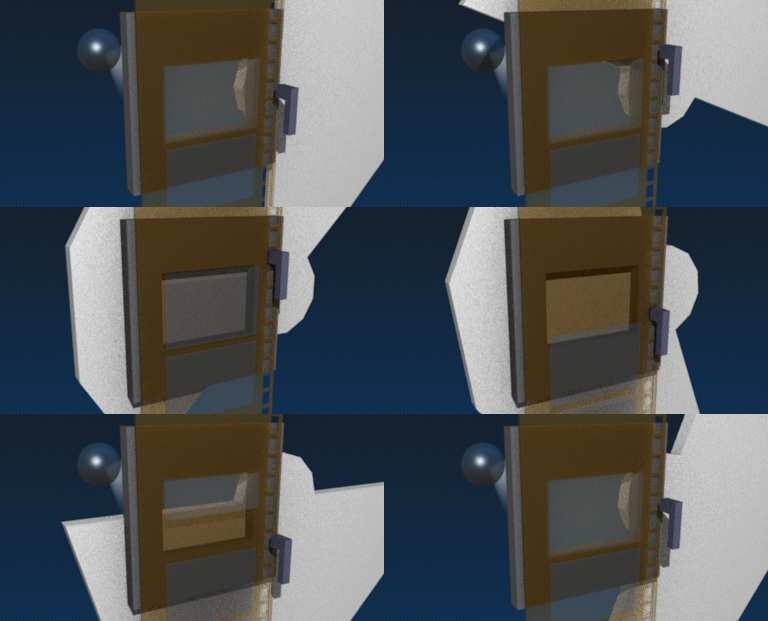
At 24 fps, this results in a shutter speed of 1/48. This creates motion blur that looks smooth and natural. It’s still used as a standard in digital cinema to match the motion quality of traditional film. For more on how it relates to cinematic motion, see 10 Tips on Achieving a More Cinematic Look.
Using a smaller angle, like 90°, shortens the exposure time and reduces blur, making motion look sharper or more chaotic. A wider angle, like 270°, increases blur and can make movement feel slower or more fluid.
Examples of Motion Blur in Film
Different directors use motion blur to create tension, realism, or visual style. Here are three examples that show how it works on screen:
Narrow Shutter Angle: Saving Private Ryan (1998)
Saving Private Ryan (1998, DreamWorks): Janusz Kamiński used a narrow shutter angle (down to 45 degrees) in the D-Day scene. This reduced blur and created harsh, staccato movement that raised the intensity of combat.
Wide Shutter Angle: Collateral (2004) & Miami Vice (2006)
Michael Mann’s digital look in Collateral and Miami Vice is often associated with very wide shutter angles (around 270°–360°), which means longer exposure per frame. That typically creates smoother motion with more visible motion blur (and less staccato “strobing”), especially in handheld moves and in the way streetlights and backgrounds smear into streaks at night.
In shots where the camera is tracking a moving car, the car itself can still appear relatively crisp while the environment blurs, which is a big part of the gliding, impressionistic nighttime feel in those films.
Collateral used this approach to show Los Angeles with a soft, ambient glow. Since the movie depicts the events of a single night where everything changes for the two main characters, the wide shutter angle helps express this compression of time.
Miami Vice pushed the method further, relying almost entirely on “found light” to build a dark, hyper-real digital world.
Experimental Techniques: Gladiator (2000)
In Gladiator, cinematographer John Mathieson used both a 45° shutter angle and various frame rates. He even went as low as 8 fps at the opening battle scene because he couldn’t shoot at 45° due to poor lighting conditions:
The narrow shutter angle made sword swings look clear and violent. As he went to a wider shutter angle and lower frame rate, you got more motion blur, which fit the end of the battle perfectly. He explains,
We got into trouble one day with the light towards the end of the battle, so we couldn’t shoot at 45 degrees. Instead, we shot everything at 8 frames, which gives you two more stops, and printed that back to 6 frames. Then we stretched that back out [to 24 fps]. Of course, each exposure is really long. You’ve got these people swinging swords, and it’s no longer frenetic with all of these sharp edges — you get a far more brushy stroke. The sword becomes almost like a fan as it gets pulled through the air. It worked very well for the scenes in question, which happen as the battle is winding down.
Source: https://theasc.com/articles/gladiator-death-or-glory
Motion Blur added in Post: The Matrix (1999)
The Matrix (1999, Warner Bros.) used a technique called “bullet time,” built with a custom rig of still cameras firing in sequence. The images from each camera were stitched together to simulate a moving viewpoint around frozen action.
This created the illusion of time slowing down or stopping entirely. Because the still cameras used fast shutter speeds, there was no natural motion blur, so the blur was added digitally to match the rest of the film. Here’s the result:
Why Motion Blur Matters for Visual Effects
Motion blur affects how realistic a scene looks, especially when adding CGI. If the blur on your digital elements doesn’t match the live-action footage, the result feels fake. That’s why VFX artists carefully match shutter settings and add artificial blur during compositing. This is part of building a clean VFX plate.
Motion blur also helps blend frame-interpolated or re-timed shots. If you slow down or speed up footage, adding blur in post can make transitions feel smoother.
How to Control Motion Blur on Set
You can adjust motion blur using camera settings and lighting. Fast shutter speeds reduce blur but require more light. Slow shutter speeds increase blur and brighten the image, but they can make fast motion hard to follow.
- Use a faster shutter (like 1/250) for clean, crisp action with reduced blur
- Use a slower shutter (like 1/24) for dreamy or smeared movement
- Follow the 180-degree rule to get a natural cinematic look
- Pan with your subject at slower shutter speeds to keep them sharp while blurring the background
- Light your scene accordingly. Faster shutters need more exposure, so plan your lighting setup in advance
In Post-Production
Motion blur can be added or adjusted in post using software like After Effects, Nuke, or Blender. These tools simulate blur based on movement direction and speed. Editors also use motion interpolation to reduce blur or fix ghosting, but this can introduce artifacts.
Matching blur across real and digital elements is key when compositing. A CGI object that’s too sharp will look fake, even if everything else is correct.
Summing Up
Motion blur is caused by movement during a frame’s exposure. It’s shaped by shutter speed, shutter angle, and frame rate. You can use it to make movement feel smooth, gritty, or stylized. Whether you’re shooting handheld chaos or precise VFX, understanding motion blur helps you make clear choices about how movement looks and feels on screen.
Read Next: Want to improve how you shoot and move the camera?
Explore all shooting techniques — from handheld and Steadicam to whip pans, slow motion, and continuous takes.
Or head back to the Cinematography section for lighting, lenses, framing, and more visual tools.
