

Published: November 17, 2025

What is a master shot? Definition & Meaning
A master shot is a continuous shot that covers an entire scene from beginning to end, showing all the characters and action in one frame. It usually captures the full blocking and setting of the scene. Editors often start with the master shot and build the rest of the scene around it using close-ups and inserts.
What the Master Shot Does
The master shot gives you a full version of the scene that can stand on its own. If close-ups or inserts don’t work, you still have a wide take that covers the full scene, including all blocking and performances.
You can also cut back to the master to remind the viewer where everyone is or to break up a fast series of close-ups.
Master shots also help with continuity. Because actors perform the full scene without stopping, their movement and timing stay consistent. Later shots (like over-the-shoulders or reaction shots) can match that exact flow.
The camera is often locked off in a standard master shot. But a complex master shot may include pans, camera movement, or characters walking in and out of frame. Either way, the master shot shows where characters are, how they move, and when key actions happen, all in a single, real-time take.
Famous Examples
A good example is in 12 Angry Men (1957, Orion-Nova). The jury room is filmed in long, wide takes that show every juror’s movement. The camera stays back, letting tension build without needing to cut.

In Raiders of the Lost Ark (1981, Lucasfilm), Indiana Jones’s lecture scene is filmed in a single wide. It shows the layout of the classroom, Indy’s position at the front of the room, and the students’ reactions. The shot shows Indy’s authority, his connection to the students, and the academic setting without needing to cut.
In an early scene from Jaws (1975, Universal), Chief Brody rides a small ferry with the mayor and town officials. The wide master shot captures all the characters in one frame, along with a parked car and the open water.
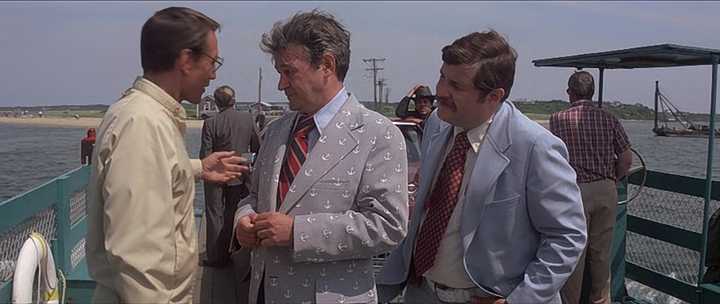
Spielberg lets the scene play out in real time, using blocking and movement within the frame instead of cuts to build tension and show power dynamics:
Master Shot vs. Establishing Shot and Coverage
An establishing shot shows location (often from the outside) and tells us where we are. A master shot shows the full action of a scene from within. You might open with an establishing shot of a house, then cut to a master shot inside the living room where the conversation takes place.
Coverage includes wide, medium, and close shots that let you control pacing, focus, and performance in the edit. The master shot gives you full coverage in one take. Editors can cut to tighter angles for detail, but can always return to the master for clarity.
Benefits, Limitations, and When to Use One
Most scenes benefit from a master shot because it captures every part of the scene in one take and gives editors flexibility. It’s a safety net. It helps with performance timing and spatial clarity. It also saves time on set because one setup records all blocking, dialogue, and movement at once.
There are also risks. If the master shot has no camera movement, weak composition, or awkward blocking, it can feel lifeless and may be hard to cut around. If the shot involves camera moves, crossing actors, or stunts, one small mistake can force a full retake.
Tips for Planning a Master Shot
Planning a master shot takes more than just placing a camera wide. You need to think about framing, movement, lighting, and how the scene plays out from start to finish. Here are a few steps to make sure your master shot works on set and in the edit.
- Frame wide enough to include all characters, key props, and movement.
- Block the scene so no one moves out of frame unless planned. Keep all important action visible.
- Light the space for a full take. Unlike a close-up, you can’t hide shadows in a master.
- Record the full scene from start to finish—even if you plan to cut later.
- Shoot tighter coverage after the master. That gives your editor flexibility to punch in or focus.
Summing Up
The master shot is a wide, continuous take that shows the full scene from start to finish. It gives you a complete version of the scene, helps with editing and continuity, and often serves as the foundation for all other shots. While not always used, it’s one of the most reliable ways to shoot a scene cleanly and clearly.
Read Next: Want to explore more shot types?
Browse all camera shots and angles, or see more cinematography techniques on lenses, lighting, and composition.
New to shot types? Read our Camera Angles FAQ for quick answers and visual examples.
